

What are Citations?
Citations track the source location of each extracted field in your document. Each extracted value includes references to the specific document blocks where the information was found. Benefits:- Verification - Validate extracted data against source
- Debugging - Identify why certain values were extracted
- Audit Trail - Document evidence for compliance
- Confidence Building - Show users where data came from
Enabling Citations
Setenable_citations: true in your configuration:
Citation Format
When citations are enabled, the output format changes to include citation references.- Without Citations
- With Citations
Default format - direct values:
Citation References
Citations use a reference format to point to document elements: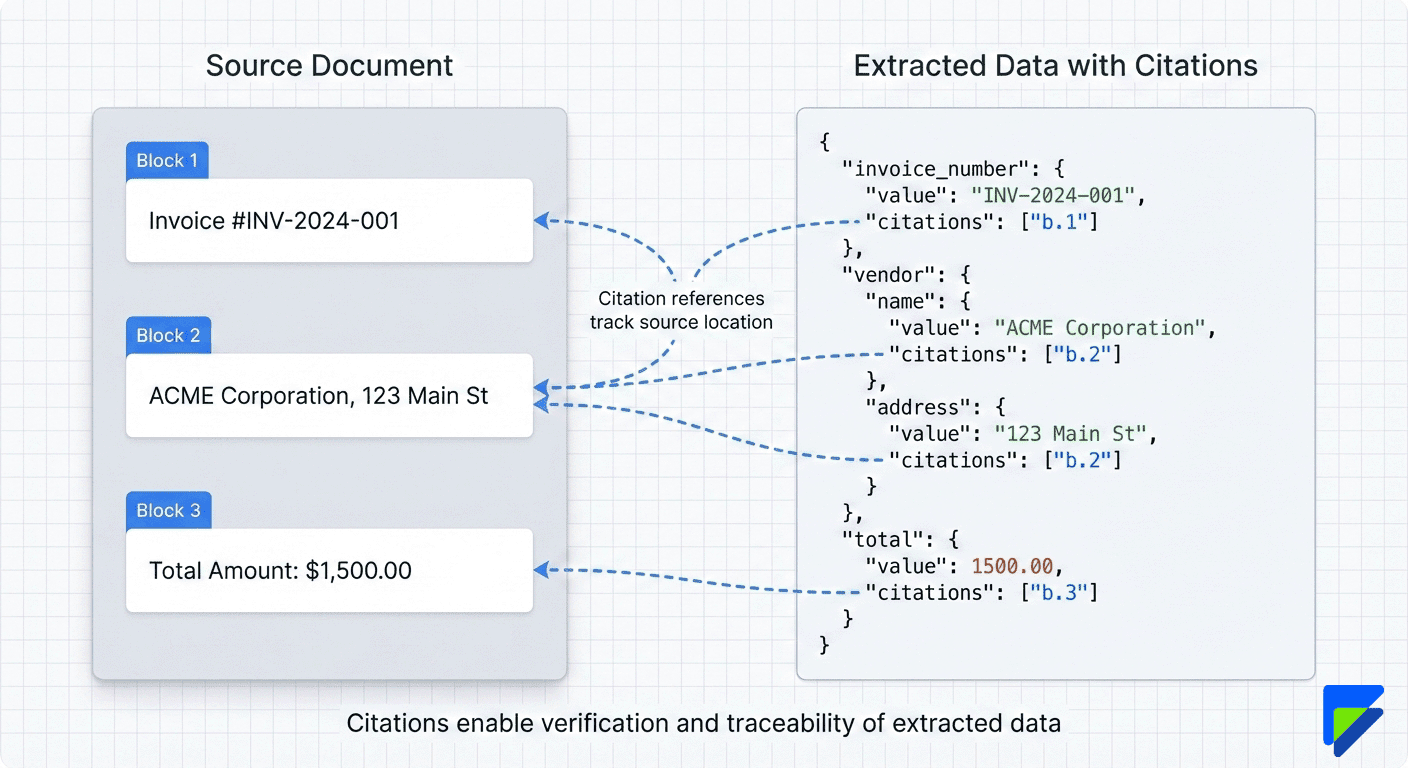
Block References (b.X)
Format: b.{block_number}
Points to a specific text block in the parsed document.
- A text block is a logical chunk of content identified by the parser
- Examples: paragraph, table cell, header, footer, line item
- Block numbers start from 0 and increment through the document
Requirements and Limitations
Parser Required
Parser Mode Restriction
Citations are automatically disabled when usingparser_mode: "LITE":
For parser mode details, see Parser Configuration.
Using Citations
Verifying Extracted Data
Citations help you verify extraction accuracy by showing source locations:- Get extraction with citations
- Review low-confidence fields - Check citation blocks
- Compare source blocks - Validate against original document
- Identify issues - Debug incorrect extractions
Citation + Confidence Scores
Combine citations with confidence scores for robust validation:- High confidence (>80) + citations - Likely accurate, spot check
- Medium confidence (60-80) + citations - Review cited blocks
- Low confidence (<60) + citations - Manual verification needed
For confidence score details, see Document Processing - Confidence Scores.
Configuration Examples
Template with Citations
Request with Citations
Disabling Citations (Override Template)
Array Fields with Citations
Citations work with array fields too:When to Use Citations
Use Citations When...
Use Citations When...
- Compliance and audit requirements
- High-value financial documents
- Legal documents requiring verification
- Debugging extraction issues
- Building user-facing verification UI
- Manual review workflows
Skip Citations When...
Skip Citations When...
- High-volume simple documents (receipts, ID cards)
- Speed and cost are priorities
- Source verification not needed
- Using parser_mode LITE for performance
- Trusted document sources with high confidence
Best Practices
Enable for Verification
Use citations for documents requiring manual review
Combine with Confidence
Check citations for low-confidence fields first
Use PLUS or PRO Mode
Citations require parser_mode PLUS or PRO
Consider Performance
Disable citations for high-volume simple docs
Next Steps
Parser Configuration
Understand parser requirements
Document Processing
Learn about processing modes
Configuration Overview
See all configuration options